Hostinger is the cheap-and-cheerful entry point to the managed hosting market: shared plans that start under $3 per month, an in-house control panel that swaps out the usual cPanel for a beginner-friendly hPanel, free SSL and migration on every tier, and an aggressive AI-tools push that newer competitors are still catching up on. The catch is the gap between the promotional price and the renewal rate, the 48-month commitment to lock in the headline number, and the lack of a true dedicated tier for sites that outgrow VPS. This guide covers what each plan includes, how Hostinger actually performs day to day, where the trade-offs live, and how to decide if Hostinger fits what you are building.
What Is Hostinger?
Hostinger International is a Lithuanian web host founded in 2004 that now runs sites for more than 29 million users across roughly 150 countries. The company built its reputation on the lowest entry price in mainstream shared hosting and has steadily moved upmarket with cloud, VPS, and managed WordPress tiers without giving up that price anchor. The current product stack covers shared hosting (Premium, Business, Cloud Startup), full cloud hosting (Startup, Professional, Enterprise), KVM-based VPS (eight tiers from 1 vCPU up to 8 vCPU), and managed WordPress that mirrors the shared tiers with WordPress-specific tooling layered on top. No bare-metal or dedicated server option ships on Hostinger today, which is the main hard ceiling on the platform.
Hostinger Hosting Plans and Pricing
Pricing on Hostinger is the single most important thing to understand before you sign up, because the headline rate and the renewal rate are different in a way that catches a lot of buyers off guard. Every promotional price assumes a 48-month commitment on shared and cloud plans (12 or 24 months on VPS), and renews at the standard rate after the first term.
- Shared Premium, around $2.99 per month on the 48-month promo, renews near $11 per month. Hosts up to 100 websites, 100 GB SSD, weekly backups, free domain for 12 months on annual plans.
- Shared Business, around $3.99 per month promo, renews near $17 per month. Doubles CPU and RAM versus Premium, adds daily backups and free CDN, fits sites with up to ~100k monthly visitors comfortably.
- Cloud Startup, around $7.99 per month promo, renews near $26 per month. Dedicated IP, priority support, 200 GB NVMe, 3 GB RAM, the entry point to Hostinger's cloud stack.
- KVM VPS, from $4.99 per month promo on the 24-month term for KVM 1 (1 vCPU, 4 GB RAM, 50 GB NVMe), scaling to KVM 8 (8 vCPU, 32 GB RAM, 400 GB NVMe). VPS plans renew at roughly 2-3x the promo rate.
- Managed WordPress, mirrors the shared and cloud tiers with WordPress staging, LiteSpeed Cache pre-installed, and built-in AI WordPress assistance.
The pricing model rewards long commitments and punishes month-to-month buyers, so the cheapest way to use Hostinger is to commit for the maximum term up front, treat the first cycle as the deal, and reassess against alternatives before renewal hits. If you only need hosting for a year, the comparison against Bluehost and DreamHost on the same term length is closer than the promo prices suggest. The full numbers and what each plan actually fits live in the Hostinger review, and the current promo can be checked on the Hostinger plans page.
hPanel: Hostinger's Control Panel
Hostinger does not use cPanel. Every Hostinger plan ships with hPanel, an in-house control panel designed to be easier for new users and free of the cPanel licensing cost that other budget hosts pass through to customers. For a site owner whose main jobs are creating email accounts, installing WordPress, managing files, and pointing domains, hPanel covers the same ground as cPanel with a cleaner interface. The trade-offs show up in three places: third-party scripts and integrations built for cPanel will not work, migrating to or from a cPanel host involves more manual steps than a cPanel-to-cPanel move, and the developer ecosystem (Softaculous catalogue, cPanel-specific WP-CLI shortcuts, server-level tweaks) is smaller. For anyone who has only known hPanel, none of this matters; for anyone moving an established WordPress site from a cPanel host, it is worth knowing before signing up.
Hostinger vs Bluehost
Both Hostinger and Bluehost dominate the budget shared hosting tier and target the same first-time WordPress buyer. The core difference is infrastructure and support model: Hostinger runs LiteSpeed Web Server with hPanel, Bluehost runs Apache with cPanel, and Bluehost carries the WordPress.org official recommendation it has held since 2005. Here is how the two compare on the points that matter most.
- Introductory price: Hostinger wins at $1.99 to $2.99 per month on the 48-month promo vs Bluehost at $2.95 for 12 months. The catch is Hostinger’s longer lock-in requirement. DreamHost offers month-to-month billing as an alternative if you do not want to commit to a multi-year term.
- Renewal price: Both jump sharply. Hostinger Premium renews near $11 per month; Bluehost Basic renews at $11.99 per month. Effectively identical at renewal.
- Control panel: Bluehost uses cPanel, which has the largest ecosystem of third-party tutorials and integrations. Hostinger hPanel is cleaner for new users but has a smaller developer ecosystem.
- Performance: Hostinger’s LiteSpeed stack is measurably faster for WordPress than Bluehost’s Apache setup. Independent tests consistently show Hostinger delivering TTFB 20 to 40 percent lower than Bluehost on comparable shared plans.
- WordPress integration: Both support one-click WordPress install. Bluehost adds WonderSuite onboarding. Hostinger adds LiteSpeed Cache pre-configured and the Kodee AI assistant for common WordPress tasks.
- Email hosting: Both include free email at your domain. Bluehost gives unlimited accounts on Plus and above; Hostinger’s included mailboxes are more limited on entry plans.
- Support: Bluehost offers 24/7 phone and chat. Hostinger is chat and ticket only with no phone support at any tier, including the Priority Support add-on.
- Money-back guarantee: Both offer 30 days.
The practical verdict: if you need cPanel familiarity, phone support, or the WordPress.org endorsement signal, pick Bluehost. If you want the fastest budget-tier WordPress stack and are fine without phone support, Hostinger’s LiteSpeed setup has the performance edge at a lower promo price. For the full Bluehost breakdown, see our Bluehost review.
Not sure which host a competitor uses? You can see which host a website runs on and line it up against Hostinger's plans before you commit.
Hostinger Performance, Uptime, and the LiteSpeed Stack
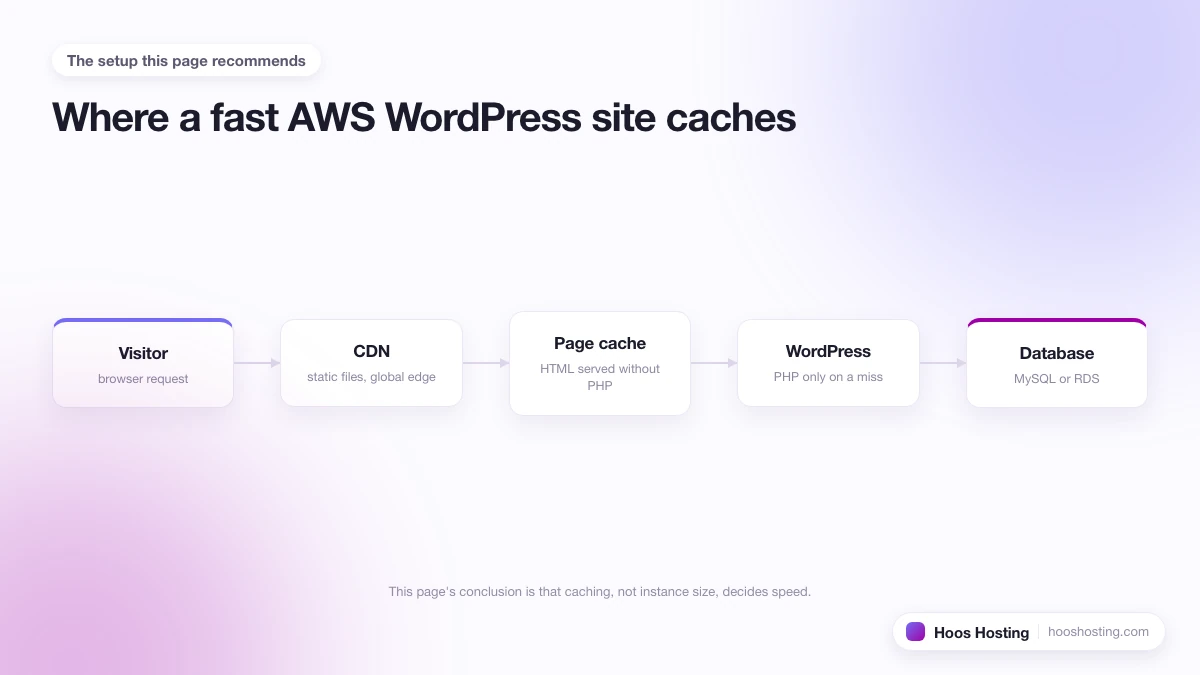
Every Hostinger plan above the entry tier uses LiteSpeed Web Server with LiteSpeed Cache, the open-source caching plugin that delivers the bulk of the performance gains on managed WordPress. Turning LiteSpeed Cache on is a two-side job (hPanel toggle plus plugin settings) that takes about ten minutes. Once a site is live, the Hostinger WordPress optimization guide covers the hPanel toggles that actually move PageSpeed numbers, including Object Cache (LSMCD) and the Hostinger CDN plan-tier catch (the step-by-step CDN activation walkthrough covers the LSCWP cache collision fix and the curl verification check). Independent monitoring across 2024 and 2025 consistently shows Hostinger sitting between 99.95 percent and 100 percent uptime on shared and cloud plans, comfortably above the 99.9 percent guarantee. Time to first byte in US and European tests typically lands in the 200-400 ms range from the same region, which is competitive with everything in the budget tier and within a single hop of premium managed hosts costing 3-5x as much. The gap between Hostinger and a premium managed host (Kinsta, WP Engine) shows up at load: how many concurrent users the plan handles before response times degrade, and how the support team handles a real incident at 3 am. For a priority-ordered checklist covering every speed lever from PHP version to the Hostinger CDN, see how to speed up WordPress on Hostinger.
Hostinger for WordPress
WordPress is the workload Hostinger is best optimised for. The managed WordPress plans add automatic core and plugin updates, LiteSpeed Cache pre-installed and configured, a built-in staging environment on Business and above, automated WordPress migration from another host (Hostinger transfers the site for free), and the newer Kodee AI assistant that handles common WordPress tasks like "install this plugin" or "find why my homepage is slow." For a single small business site, the managed WordPress Business plan is usually the right starting point because it includes daily backups, the staging tool, and the CDN that the cheaper Premium plan lacks. For agencies running ten or more client sites, Cloud Startup or above makes sense because the dedicated IP, priority support, and higher resource limits matter more than the per-site cost.
Hostinger for WooCommerce
Hostinger supports WooCommerce on all tiers, but the plan you need depends on catalog size and traffic. The entry Premium shared plan handles a store with under 50 products and a few hundred daily visitors, but it will struggle with flash sales or sudden traffic spikes. The Business plan, with higher CPU and RAM allocation and daily backups, is the minimum comfortable starting point for a store expecting steady growth. For a store running more than 200 products or processing over 50 orders a day, Cloud Startup or a KVM VPS tier is the right move.
Two WooCommerce-specific points worth knowing on Hostinger: LiteSpeed Cache handles WooCommerce cart session exclusions automatically, which avoids the caching-breaks-checkout problem that catches teams on some other shared hosts off guard. And Hostinger does not charge extra for SSL on top of the hosting plan, so the all-in monthly cost of running a small store is lower than platforms that bill SSL separately. The 100 GB SSD on Premium plans is enough for a medium-sized catalog, but stores with a large number of high-resolution product images should benchmark storage usage before committing to the cheapest tier.
Hostinger VPS and Cloud Hosting
The KVM VPS tier is where Hostinger competes directly with DigitalOcean and Vultr, with the difference that Hostinger ships a panel and a one-click app installer rather than expecting you to manage the box from the command line. KVM 1 starts at 1 vCPU, 4 GB RAM, and 50 GB NVMe; KVM 8 reaches 8 vCPU, 32 GB RAM, and 400 GB NVMe. All VPS plans include free weekly backups, snapshots, full root access, and a choice of OS templates including WordPress, Minecraft, Docker, cPanel, and Plesk. The trade-off with raw cloud (Cloudways, Vultr, DigitalOcean) is that Hostinger's VPS uptime guarantee and support response are tuned for site owners rather than developers, so if you want infrastructure-level fine-tuning, a true cloud provider is a better fit. For everyone else, a Hostinger KVM at one-third the price of a managed alternative is hard to beat.
Hostinger Domains and Email
Every Hostinger annual managed WordPress, cloud, or shared plan above Single includes a free domain registration for the first year, after which standard renewal rates apply (around $13 per year for .com at the time of writing). Hostinger also runs its own domain registrar with promotional pricing on .com, .net, .online, .store, and .tech, often cheaper than Namecheap or GoDaddy on the first year. Email accounts come through the same hPanel: every plan above Single includes free business email at your domain with anti-spam and webmail. The catch is that the included email is basic (a few mailboxes, no calendar or shared inbox), and most operators outgrow it within a year and switch to Google Workspace or Microsoft 365.
Hostinger Review
For the long-form verdict (real-world speed tests, support quality, billing experience, who should and should not pick Hostinger), the full Hostinger review covers the day-to-day reality of running a site there over a year, including the surprises that do not show up in marketing copy.
Hostinger Drawbacks and What to Watch For
Three things to be aware of before you commit:
- Renewal pricing. The promotional rate ends after the first term and renewals jump 3-6x. Calendar a reminder a month before the renewal date so you can either pre-pay another long term, switch plans, or move.
- No phone support, even on Priority. Hostinger only offers chat and ticket support, and even the Priority Support add-on does not unlock phone access. For most sites this is fine because chat response is fast and skilled, but if real-time voice escalation matters to you, this is a hard miss.
- No dedicated server tier. The ceiling on Hostinger is KVM 8 (8 vCPU, 32 GB RAM). Sites that need dedicated hardware or specialised compliance need to plan a host move at that scale; Hostinger will not stretch further.
- Migration quality varies. The free WordPress migration is automated and usually completes inside 24 hours, but more complex sites with custom plugins, large databases, or unusual server configurations sometimes need follow-up tickets to clean up. Plan for a day or two of QA after the migration completes.
- Account suspension reports. A pattern of complaints across review sites mentions accounts suspended without warning for high resource usage, especially on Premium and Business shared plans. Move to Cloud Startup or VPS once a site approaches the soft limits rather than waiting for a suspension email.
Is Hostinger Right for You?
Hostinger is the right pick for a single small business site, a personal portfolio, a small ecommerce store, or an agency running up to 20-30 client sites that do not need bespoke server configuration. The managed WordPress Business plan, locked in for 48 months, is the sweet spot for a site doing 10-50k monthly visitors. Hostinger is the wrong pick for sites that need a dedicated server, sites that depend on cPanel-specific tooling and cannot migrate, applications that demand sub-100 ms time to first byte everywhere in the world (which needs a tier-1 CDN integration like Kinsta or WP Engine), and any operator who relies on phone support for incidents (where InMotion Hosting is the better-priced alternative thanks to US-based phone support on every plan).
How to Get Started with Hostinger
Pick the plan that matches the site you are launching today, not the site you hope to grow into; you can upgrade in place when the time comes, and starting smaller saves real money against the long renewal cycles. For a brand-new WordPress site, managed WordPress Premium is the cheapest viable entry, but managed WordPress Business is where the staging environment, daily backups, and CDN unlock real productivity. For an agency consolidating multiple client sites, Cloud Startup or KVM 4 are the better starting points. The current promotion and the full plan comparison are on the Hostinger plans page; both ship with a 30-day money-back guarantee, so the worst case for a wrong-plan choice is a refund and a switch. For a step-by-step walkthrough that goes from account creation through DNS cut-over, the Hostinger setup and migration guide covers every decision in order.