Cloudways is a managed cloud hosting platform that sits between traditional shared hosting and bare-metal cloud servers. Instead of owning data centers, Cloudways acts as a management layer on top of five infrastructure providers: DigitalOcean, Vultr, Linode (now Akamai), AWS, and Google Cloud. You pick the provider, choose a server size, and Cloudways handles the stack: operating system updates, security patches, caching, and backups. The servers function like VPS environments in practice, giving you dedicated resources without the overhead of managing a raw cloud server yourself.
How Cloudways Works
Traditional hosting companies sell you space on hardware they own. Cloudways does something different. When you create a server through Cloudways, it provisions a virtual machine on your chosen cloud provider and installs its own optimized stack on top. That stack includes Apache or Nginx, MySQL or MariaDB, PHP-FPM, Redis, Memcached, and Varnish. You interact with the Cloudways platform through a custom dashboard rather than a raw cloud console. For a budget-tier alternative with a different trade-off (in-house control panel, lower entry price, no dedicated tier), the Hostinger guide is the right comparison.
Why the Middleman Model Works in Your Favour
This matters because it removes the two biggest barriers to cloud hosting. First, you do not need to know Linux system administration. Second, you avoid the unpredictable billing that comes with raw cloud providers. Cloudways charges a flat monthly rate per server with no bandwidth surprises. You get cloud-grade infrastructure without needing to touch a terminal or read AWS invoices line by line.
What the Optimized Stack Actually Means
When Cloudways says the stack is optimized, it means PHP-FPM is pre-configured for WordPress workloads, Redis is available for object caching out of the box, and Varnish sits at the front of the stack to serve cached pages without hitting PHP at all. On a standard shared host you would configure all of that yourself or pay extra for it. On Cloudways it is installed and ready to toggle on from the dashboard.
Cloudways Pricing
Cloudways bills monthly on a pay-as-you-go basis. There are no annual contracts and no renewal price hikes: the rate you sign up at is the rate you keep paying. Pricing starts at roughly $14 per month for a 1GB RAM DigitalOcean server and scales up based on the provider and resources you select.
Entry-Level Pricing by Provider
Here is what each provider tier looks like at the entry level:
- DigitalOcean - from $14/month (1GB RAM, 25GB SSD, 1TB bandwidth)
- Vultr - from $14/month (1GB RAM, 25GB SSD, 1TB bandwidth)
- Linode (Akamai) - from $14/month (1GB RAM, 25GB SSD, 1TB bandwidth)
- AWS - from $38/month (2GB RAM, 20GB SSD, 2GB bandwidth)
- Google Cloud - from $37/month (1.7GB RAM, 20GB SSD, 2GB bandwidth)
| Provider | Entry Price | Best For | Data Centers |
|---|---|---|---|
| DigitalOcean | $14/month | Most WordPress sites; widest selection of tutorials and community resources | North America, Europe, Asia Pacific |
| Vultr | $14/month | Good Southeast Asia and South America coverage; comparable to DigitalOcean | 30+ locations globally |
| Linode (Akamai) | $14/month | Solid alternative to DigitalOcean; strong US and EU coverage | North America, Europe, Asia Pacific |
| AWS | $38/month | Compliance requirements, specific regional coverage, enterprise workloads | 30+ regions globally |
| Google Cloud | $37/month | Google infrastructure preference, specific GCP compliance needs | 35+ regions globally |
DigitalOcean and Vultr are the most popular choices for small-to-medium WordPress sites. For a deeper look at DigitalOcean as a standalone platform with self-managed Droplet pricing, see our DigitalOcean hosting guide. AWS and Google Cloud make sense when you need a specific region or compliance requirement that only those providers offer. If you are not sure which to pick, our guide on choosing a hosting supplier on Cloudways breaks down the decision.
How to Pay Less on Cloudways
Cloudways does not publish rotating discount codes the way budget shared hosts do. The main ways to reduce your bill: choose DigitalOcean or Vultr over AWS or Google Cloud at the entry level (same performance for most WordPress use cases, lower cost), consolidate multiple low-traffic client sites on one server rather than individual servers per site, and scale down a server that has been overprovisioned since launch.
What Cloudways Includes (and What It Does Not)
Every Cloudways server comes with a set of features built into the price:
- Free SSL certificates via Let's Encrypt - see our SSL installation guide for the setup steps, and the broader Cloudways security and SSL guide for the WAF, file-permission, and Cloudflare Full (Strict) details
- Automated backups on a schedule you choose, with one-click restore
- Built-in caching - Varnish, Memcached, and Redis are pre-installed
- Free site migration using the Cloudways WordPress Migrator plugin
- Staging environments - clone your live site to test changes before pushing them
- SSH and SFTP access for direct server management
- Team collaboration - add team members with role-based permissions
- 24/7 support via live chat and ticketing
What Cloudways does not include: email hosting (you will need a third-party service like Google Workspace or Zoho), domain registration (buy your domain elsewhere and point it to your server), and phone support (available only as a paid add-on).
Cloudways Paid Add-Ons Worth Knowing About
Cloudways keeps the base plan lean and sells optional extras on top. Three are worth evaluating depending on your use case:
- Cloudflare Enterprise CDN. Available for a few dollars per month per app, this upgrades the free Cloudflare tier to Cloudflare's enterprise network, which includes a web application firewall, image optimisation, and a higher cache hit ratio for dynamic content. Most low-traffic sites do not need it; high-traffic or security-sensitive sites often find the WAF alone worth the cost.
- Premium Support. Cloudways' paid support tier adds a dedicated account manager, priority ticket routing, and guaranteed response times. The standard live chat is good for most issues, but if a production outage costs real money per minute, the SLA-backed response time on the premium tier pays for itself during one serious incident.
- Rackspace Email / Google Workspace (via add-on). Cloudways partners with Rackspace to offer professional email hosting directly from the dashboard, which saves you from setting up a third-party email account separately. Google Workspace can also be added through the same flow. Either option is cheaper and simpler than managing email outside Cloudways if you are already in the dashboard every week.
Cloudways Performance
Speed is where Cloudways earns its reputation. Because each application runs on its own isolated stack with dedicated resources, you do not share CPU or RAM with other customers the way you do on shared hosting plans from Bluehost or Hostinger.
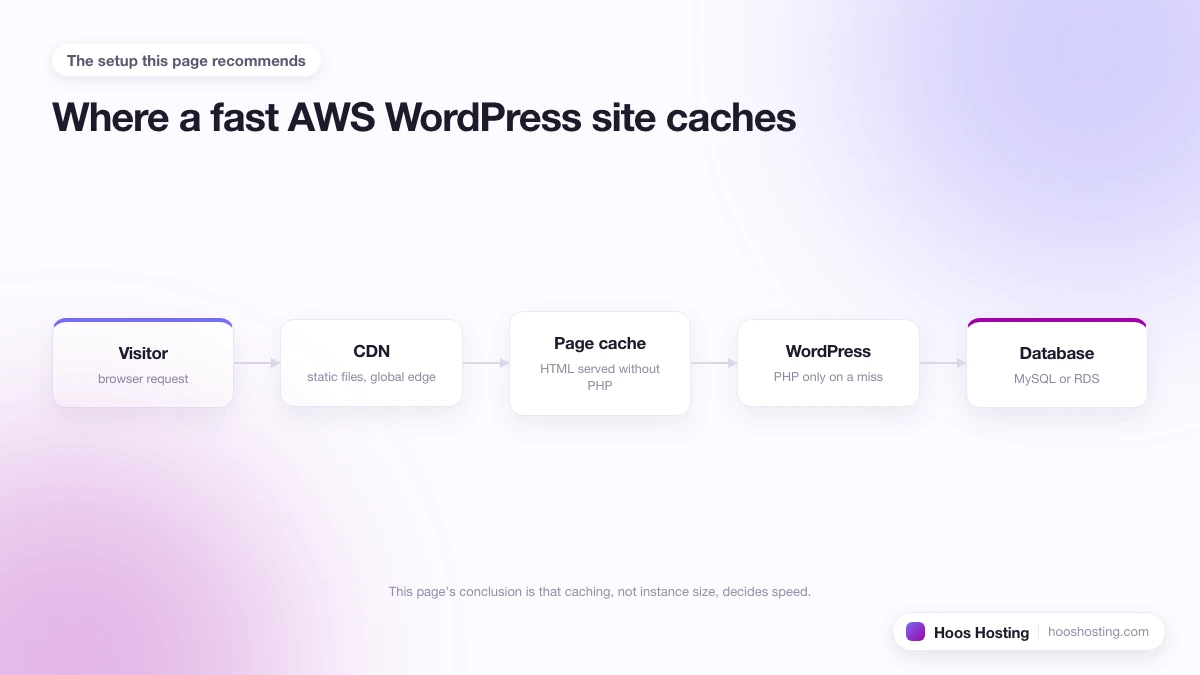
The Three-Layer Caching Stack
The three-layer caching stack (Varnish at the server level, Redis and Memcached for object caching, and Cloudflare Enterprise CDN as an add-on) means most page requests never hit PHP. For WordPress specifically, you can push this further. Our guide on making Cloudways faster for WordPress covers the full optimization process, and you can also check whether WP Rocket is worth adding on top. For the complete overview of every cache layer and how to tune them together, see our Cloudways performance and speed guide.
Real-World Benchmarks vs Shared Hosting
In practice, switching a mid-size WordPress site from shared hosting to a $14 DigitalOcean server on Cloudways typically cuts Time to First Byte (TTFB) from 800ms to 900ms down to under 200ms on cached pages. Uncached requests (like logged-in WooCommerce sessions) are faster too because PHP-FPM workers are not shared across hundreds of other accounts. The gains are most visible during traffic spikes: a shared host slows down as neighbours compete for the same CPU pool, while a Cloudways server maintains consistent response times because your resources are not shared.
Cloudways vs Traditional Hosting
The most common question people ask is whether Cloudways is worth the price jump over budget shared hosting. The short answer: if your site gets more than a few hundred visitors a day, or if page speed matters for your business, the difference is meaningful.
Resource Isolation: The Core Difference
On shared hosting, your site shares a physical server with hundreds or thousands of other sites. One neighbour running a heavy database query can slow your site down. On Cloudways, you get an isolated virtual server with guaranteed resources. The tradeoff is that Cloudways requires slightly more setup: there is no cPanel, and you need to configure your DNS separately. For a deeper breakdown, read our comparison of Cloudways vs regular hosting.
Cloudways vs Managed WordPress Hosts
Cloudways is also different from fully managed WordPress hosts like Kinsta. Kinsta handles everything including WordPress updates and has a more polished dashboard, but it costs significantly more and limits the number of sites per plan. For a full breakdown of Kinsta plans, pricing, and a pros and cons summary, see the Kinsta hosting guide. Cloudways lets you host unlimited applications on a single server: you only pay for the server resources, not per site.
If you are weighing Cloudways against the setup a site you admire already runs on, it helps to know what that site uses. You can find out who is hosting any website in seconds and compare it with what Cloudways offers.
Getting Started with Cloudways
Setting up a new WordPress site on Cloudways takes about ten minutes. The process goes like this: create an account (a 3-day free trial is available with no credit card), deploy a server on your chosen provider, install WordPress as an application on that server, and point your domain. Our full Cloudways setup guide walks through each step with screenshots.
What Happens When the Free Trial Ends
When the 3-day trial ends, your server continues running and Cloudways charges your card on the standard hourly rate. Nothing shuts down automatically. If you decide not to continue, delete your server before the trial ends and you will not be charged. If you forget, Cloudways will send a billing email at the end of the first full month.
Migrating an Existing WordPress Site
If you already have a WordPress site elsewhere, the migration process uses a free plugin that copies your files and database automatically. For a side-by-side look at the plugin route, the free managed migration option, and the manual SFTP path, our Cloudways setup and migration guide covers all three with a pre-flight checklist. If you are moving from SiteGround specifically, our SiteGround to Cloudways migration guide covers the SG Optimizer removal, email separation, and DNS cutover steps in detail.
Server Management on Cloudways
Once your site is running, the Cloudways dashboard gives you control over server-level settings without needing SSH. You handle the tasks below from the same dashboard you used to deploy the server. Unlike cPanel, where settings are scattered across multiple tools, Cloudways keeps server-level operations in one place under Application Management and Server Management tabs. Here are the tasks you will use most often and what triggers each one:
- Scaling your server - increase RAM and CPU with a few clicks when traffic grows. Takes 1-2 minutes and requires no downtime.
- Application backups and server backups - on-demand and scheduled. Application backups are faster to restore if you only need to roll back one site rather than the entire server.
- Setting up cron jobs for scheduled tasks. WordPress wp-cron is unreliable on high-traffic sites; server cron is the more stable option.
- Viewing application logs for debugging errors. The error log is the first place to check for PHP fatal errors, plugin conflicts, and 500 errors.
- Resetting file permissions after plugin installations or updates. Incorrect permissions (especially after a manual file upload) cause admin panel errors and 403 blocks.
- Changing your domain name if you rebrand or migrate. The Cloudways domain change requires a dashboard update, a Varnish cache purge, and a WordPress search-replace to avoid hardcoded URL issues.
DNS Options on Cloudways
For DNS, Cloudways offers the DNS Made Easy add-on for managing records directly from the dashboard, or you can use an external DNS provider like Cloudflare. Cloudflare is the more popular choice because it is free, adds a CDN layer, and gives you DDoS protection on top of the Cloudways infrastructure. For backups, cron jobs, logs, scaling, and a routine maintenance schedule in one place, see the Cloudways management and maintenance guide.
Hosting Multiple Sites on One Server
One of Cloudways' strongest selling points for freelancers and agencies is that you can host multiple websites on a single server. Each site runs as a separate application with its own PHP version, database, and SSL certificate. You only pay for the server, not per site: so running five low-traffic client sites on a $28/month server costs $5.60 each rather than $14 per site on separate servers.
The catch is resource sharing. If one application spikes, it can starve the others. Monitor your server load and scale up before that happens.
Choosing a Server Location
Server location affects page load time more than almost any other variable. Cloudways gives you access to data centers across North America, Europe, Asia, Australia, and South America through its five provider partners. Pick the location closest to where most of your visitors are. Our guide on choosing the best Cloudways server location explains how to decide and what to do if your audience is spread across multiple regions.
Cloudways Support: What to Expect
Cloudways offers 24/7 support via live chat and a ticketing system. Chat response times for routine questions are typically under five minutes during business hours and somewhat longer overnight. For complex server-level issues, the Cloudways technical team can connect directly to your server, which is a capability that traditional shared hosts do not offer.
What Cloudways Support Will and Will Not Fix
One important boundary: Cloudways support handles the server and platform. They will help you with SSL certificates, server scaling, backup restores, caching configuration, and deployment. They will not debug your WordPress theme, custom plugin conflicts, or PHP application code. For those issues you need a WordPress developer or specialist support (Kinsta's premium plans include WordPress-specific support, for comparison).
Phone support is available as a paid add-on through Cloudways Premium Support plans. Most site owners on standard plans find the live chat team handles 90% of issues without escalation. If uptime is business-critical and you need guaranteed response times around the clock, the premium plan pays for itself during one serious incident.
Cloudways Free Trial and Pricing Tips
Cloudways offers a 3-day free trial with no credit card required. During the trial, you deploy a real server (not a sandbox), install WordPress, and run actual tests. There are no artificial limits: the trial server performs identically to a paid server, which means you can benchmark your current host against Cloudways before committing.
The pricing model rewards right-sizing. A 1GB DigitalOcean server handles most low-to-medium traffic WordPress sites comfortably. Starting small and scaling up when you hit resource limits costs less over a year than over-provisioning from day one. The Cloudways Monitoring tab shows CPU and RAM trends, so you can see when a server is genuinely underprovisioned rather than guessing.
Cloudways for WooCommerce
WooCommerce stores have requirements that set them apart from standard WordPress blogs, and Cloudways addresses most of them at the infrastructure level. Here is what to know before choosing Cloudways for an online store.
Why Isolated Resources Matter for Checkout
Checkout is the page you cannot afford to slow down. On shared hosting, a sudden influx of visitors from a promotion can slow every page, including your cart and payment gateway. On Cloudways, your application has dedicated RAM and CPU. A spike in session activity does not steal resources from other tenants. This matters most during flash sales or product launches when your traffic can jump 5x to 10x in minutes.
Varnish and Redis Caching Exclusions for WooCommerce
Cloudways enables Varnish by default, but Varnish caches full page responses. For WooCommerce, this creates a problem: cart contents, logged-in user sessions, and the checkout page must never be served from a full-page cache, or customers will see each other's cart data. Cloudways pre-configures Varnish exclusion rules for WooCommerce's core pages (cart, checkout, my-account), and Breeze, the Cloudways caching plugin, handles the WooCommerce exclusions automatically. If you install WP Rocket or another third-party caching plugin, you need to manually add the WooCommerce exclusion rules for the cart fragment and session cookies; skipping this step causes cart count bugs and checkout errors. Our guide on using WP Rocket with Cloudways covers how to configure those exclusions correctly.
Handling Traffic Spikes Before a Sale
The Cloudways scaling process takes one to two minutes and requires no downtime. That means you can scale up the night before a major promotion and scale back down afterward, paying only for the hours at the higher tier. A $56/month 4GB server scaled down to $28/month after a 48-hour sale event costs about $2 extra for the upgrade window. No shared host gives you that kind of on-demand flexibility without a full plan upgrade.
The Cloudflare Enterprise WAF for Stores
WooCommerce stores are targets for card testing attacks, where bots run hundreds of small transactions to verify stolen card numbers. The Cloudflare Enterprise WAF add-on available through Cloudways includes rules that rate-limit checkout attempts and block known bot signatures. For a store processing real revenue, the $4 to $5 per month per application cost is low compared to the merchant fees and chargeback risk from a single successful carding attack.
Common Cloudways Mistakes Beginners Make
Most Cloudways setup problems come from the same handful of misconfigurations. If something is not working the way you expect, check this list first.
Confusing Application Backups with Server Backups
Cloudways offers two separate backup systems: server-level backups and application-level backups. They are configured independently. Many new users enable server backups and assume their application files are covered. They are not always in sync. Set up application backups separately for each WordPress install on your server, not just one server-level backup. The application backup is also faster to restore from if you only need to roll back one site rather than the entire server.
Choosing the Wrong Provider for Your Region
DigitalOcean and Vultr have the widest data center coverage for North America and Europe. If your audience is in Southeast Asia or South America, Vultr and Linode have the better regional footprint. AWS and Google Cloud have the most data center locations globally, but their entry-level pricing is two to three times higher. Most beginners default to DigitalOcean without checking which provider has a data center closest to their audience. Spending five minutes on the server location decision saves you from unnecessary latency for the life of the site.
Not Enabling the Breeze Cache Plugin
Cloudways installs Varnish, Redis, and Memcached on the server, but Varnish caching at the WordPress application level requires the Breeze plugin to be installed and configured. Many new users skip this step, assuming caching works automatically at install. Without Breeze active, WordPress serves dynamic PHP responses for every page request, ignoring the Varnish layer entirely. Install Breeze, enable full-page caching, and set appropriate cache exclusions for logged-in users and WooCommerce pages before you launch.
Wasting the Free Trial on a Demo Site
The 3-day trial deploys a real server with full performance, not a throttled demo environment. New users often spin up a basic WordPress install, poke around the dashboard, and let the trial expire without running any meaningful tests. A better use of the trial: migrate your current live site using the free migration plugin, run a before-and-after speed test against your existing host, and check TTFB from your target audience location. That gives you concrete data to justify the switch before you pay anything.
Forgetting to Set Up Email Before Launching
Cloudways does not include email hosting. New users frequently finish their site setup, go live, and then discover their contact forms and WooCommerce order notifications have nowhere to send from. Before launch, either add the Rackspace Email or Google Workspace add-on through the Cloudways dashboard, or configure an SMTP plugin (like WP Mail SMTP) pointing to a third-party transactional email provider such as Mailgun or SendGrid. Setting this up after launch often means lost form submissions and order emails from the window between go-live and email configuration.
Who Cloudways Is Best For
Cloudways fits a specific type of user well:
- WordPress site owners who have outgrown shared hosting and want better speed without managing a raw VPS
- Freelancers and agencies who manage multiple client sites and want to consolidate them on one bill
- WooCommerce stores that need reliable performance during traffic spikes
- Developers who want SSH access and staging environments without the overhead of server administration
When Cloudways Is Not the Right Choice
It is less ideal for complete beginners who want email, domain registration, and a website builder in one place. For that use case, a traditional host like Bluehost is simpler to start with, and InMotion Hosting is the closest equivalent that bundles real US-based phone support on every plan.
Final Word: Is Cloudways Worth It?
Cloudways works best for sites that have outgrown shared hosting and need reliable performance without the overhead of managing a raw VPS. The pay-as-you-go pricing, instant scaling, and pre-configured WordPress stack make it a practical choice for growing sites and agencies managing multiple clients. The main trade-offs are no bundled email, no domain registration, and no phone support on standard plans.
A 3-day free trial is available with no credit card required, so you can deploy a real server, install WordPress, and run your own benchmarks before committing. For platform benchmarks and a feature breakdown by plan, see our full Cloudways review. To get started with deployment, follow our Cloudways setup guide.